Available on iOS & Android

ScanSmarter.
GoPaperless.

AI-powered OCR, smart edge detection, and instant PDF export — all offline. Your documents, beautifully organized.

Choose how to add files — Document, Book, ID Card, Business Card, Import or QR.
Add Content

Features

Everything you need.
Nothing you don't.

AI-Powered OCR

Scan a page — get clean, copyable text in seconds. 50+ languages, 99.2% accuracy, every glyph processed on-device.

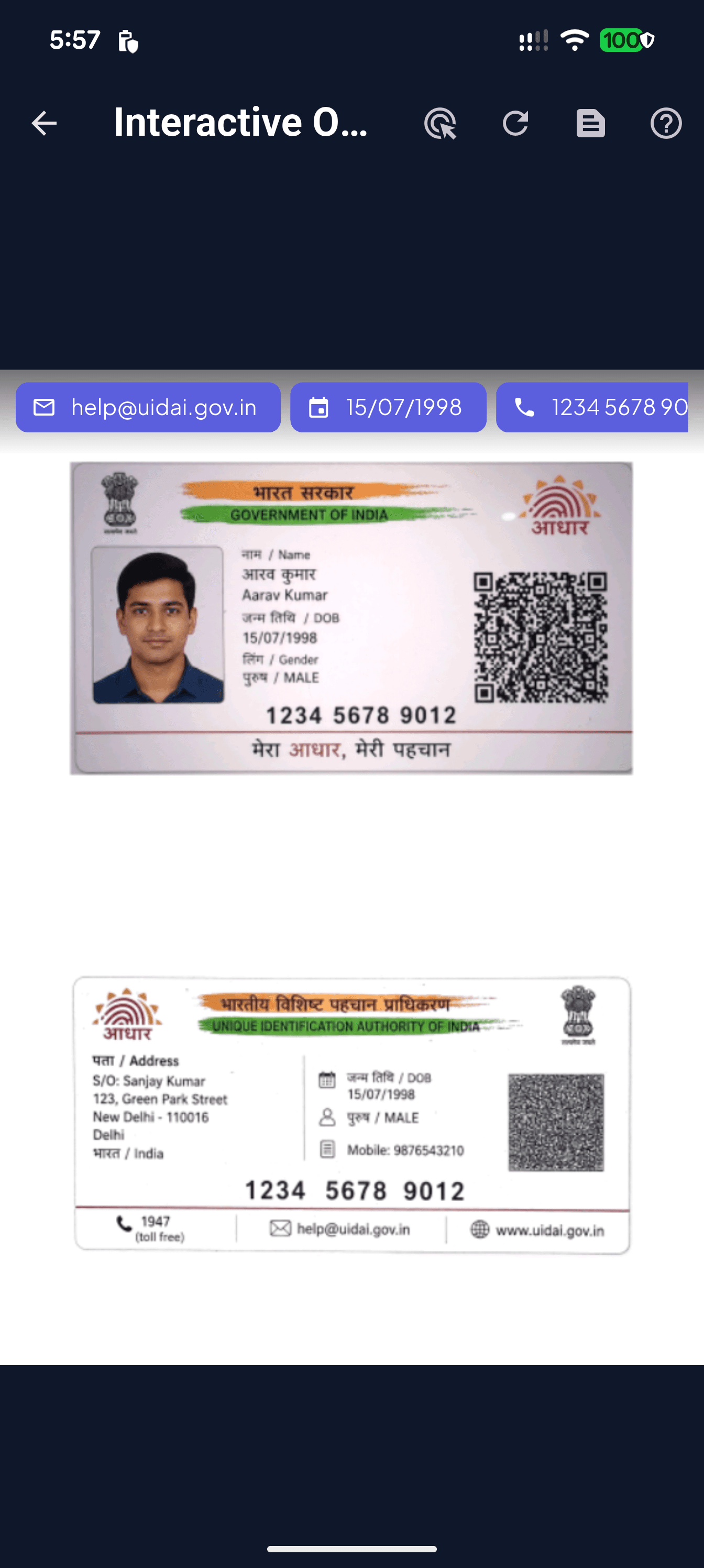
Tap any extracted entity — emails, phones, dates — to act on it instantly.
Scan
On-device OCR across English, Hindi, Devanagari and more — never leaves your phone.
Text

Smart Edge Detection

Live boundary tracking with auto-capture for crisp ID cards and documents.

AI traces the page boundary in real time and corrects perspective the moment you tap capture.

Full PDF Toolkit

Merge, compress, watermark, sign, lock — every tool in one sheet.

Merge, compress, lock, watermark, sign, split, sync to Drive — every PDF tool you need.

Offline First

Every feature — scanning, OCR, PDF tools — works without an internet connection. Airplane mode? No problem. Your data never has to leave the device.

Choose how to add files — Document, Book, ID Card, Business Card, Import or QR.

Walk-through

From paper to searchable PDF
in five taps.

Step 01

Capture anything.

Point, frame, done. Real-time edge detection locks onto receipts, IDs, books and business cards — auto-capture fires the moment your hands stop shaking.

AI traces the page boundary in real time and corrects perspective the moment you tap capture.
Step 02

Choose how you scan.

Document. Book spreads. ID front + back. Business card OCR. Or import an existing PDF — one bottom sheet, every workflow.

Choose how to add files — Document, Book, ID Card, Business Card, Import or QR.
Step 03

Read what's inside.

Tap any extracted email, date or phone number to act on it instantly. Interactive OCR turns scanned ink into live, copyable, shareable data.

Tap any extracted entity — emails, phones, dates — to act on it instantly.
Step 04

Across every script.

On-device multi-language OCR — English, Hindi, Devanagari, Chinese, Japanese, Korean. No server round trips. No data leaving your phone.

On-device OCR across English, Hindi, Devanagari and more — never leaves your phone.
Step 05

Then rule the PDF.

Merge, compress, lock, watermark, sign, split, sync to Drive — every PDF tool you'd reach for a desktop app for, in one beautiful sheet.

Merge, compress, lock, watermark, sign, split, sync to Drive — every PDF tool you need.
Built for Tablets

A real desktop on
your tablet.

Every grid, sheet and editor expands intelligently on larger screens. Annotate with a stylus, design watermarks with live preview, switch reader themes — without ever opening a laptop.

01 / 06

Document Library

Your scans, beautifully organized in a responsive grid that scales to tablets.

Your scans, beautifully organized in a responsive grid that scales to tablets.
Highlight, underline, redact, sign, stamp and reorder pages — full PDF editor on tablet.
Tile, stretch or pin custom watermarks with live preview and per-page control.
Warm, paper-like tones for long reading sessions.
EAN-13 and barcodes go straight to Amazon and other stores.
Quick-add sheet adapts to large screens.

Technical Specs

Built for
professionals.

Every detail engineered for speed, accuracy, and reliability. From camera to PDF in seconds.

Camera Resolution SupportUp to 48MP
Edge DetectionAI-powered, real-time
Perspective CorrectionAutomatic
Batch ScanningUnlimited pages
Color ModesColor, Grayscale, B&W, Auto-enhance

Every screen

A glimpse of what's
in your pocket.

Choose how to add files — Document, Book, ID Card, Business Card, Import or QR.
Tap any extracted entity — emails, phones, dates — to act on it instantly.
On-device OCR across English, Hindi, Devanagari and more — never leaves your phone.
Real-time edge detection with auto-capture for crisp ID and document scans.
Merge, compress, lock, watermark, sign, split, sync to Drive — every PDF tool you need.
AI traces the page boundary in real time and corrects perspective the moment you tap capture.
Merge, compress, lock, watermark, sign, split, sync to Drive — every PDF tool you need.
Real-time edge detection with auto-capture for crisp ID and document scans.
On-device OCR across English, Hindi, Devanagari and more — never leaves your phone.
Tap any extracted entity — emails, phones, dates — to act on it instantly.
Choose how to add files — Document, Book, ID Card, Business Card, Import or QR.
AI traces the page boundary in real time and corrects perspective the moment you tap capture.
Merge, compress, lock, watermark, sign, split, sync to Drive — every PDF tool you need.
Real-time edge detection with auto-capture for crisp ID and document scans.
On-device OCR across English, Hindi, Devanagari and more — never leaves your phone.
Tap any extracted entity — emails, phones, dates — to act on it instantly.
Choose how to add files — Document, Book, ID Card, Business Card, Import or QR.
Tap any extracted entity — emails, phones, dates — to act on it instantly.
On-device OCR across English, Hindi, Devanagari and more — never leaves your phone.
Real-time edge detection with auto-capture for crisp ID and document scans.
Merge, compress, lock, watermark, sign, split, sync to Drive — every PDF tool you need.
AI traces the page boundary in real time and corrects perspective the moment you tap capture.

Reviews

Loved by thousands
around the world.

4.9 average from 10,000+ reviews

Replaced my office scanner entirely. The OCR accuracy is insane — it even reads my doctor's handwriting.

S
Sarah M.
App Store

Best scanner app I've used. The edge detection is flawless and PDFs look professional every time.

R
Raj P.
Google Play

Love that everything works offline. I scan receipts on the go without worrying about data usage.

E
Emma L.
App Store

The batch scanning feature saved me hours. Scanned 200 pages of contracts in under 10 minutes.

J
James K.
Google Play

Replaced my office scanner entirely. The OCR accuracy is insane — it even reads my doctor's handwriting.

S
Sarah M.
App Store

Best scanner app I've used. The edge detection is flawless and PDFs look professional every time.

R
Raj P.
Google Play

Love that everything works offline. I scan receipts on the go without worrying about data usage.

E
Emma L.
App Store

The batch scanning feature saved me hours. Scanned 200 pages of contracts in under 10 minutes.

J
James K.
Google Play

Finally an app that handles Japanese text recognition perfectly. Switched from CamScanner instantly.

Y
Yuki T.
App Store

Clean UI, fast exports, great quality. This is what a premium scanner app should feel like.

M
Marcus D.
Google Play

The AI categorization is magical. It auto-tags my receipts, IDs, and documents without me lifting a finger.

A
Aisha B.
App Store

PDF encryption gives me peace of mind for sensitive documents. Security + convenience in one app.

C
Carlos R.
Google Play

Finally an app that handles Japanese text recognition perfectly. Switched from CamScanner instantly.

Y
Yuki T.
App Store

Clean UI, fast exports, great quality. This is what a premium scanner app should feel like.

M
Marcus D.
Google Play

The AI categorization is magical. It auto-tags my receipts, IDs, and documents without me lifting a finger.

A
Aisha B.
App Store

PDF encryption gives me peace of mind for sensitive documents. Security + convenience in one app.

C
Carlos R.
Google Play